ScaleUp: The Startup Presentation Template for Modern Growth
When you're building a company, the way you present your idea matters just as much as the idea itself. A cluttered, generic slide deck can undermine even the most brilliant concept. That’s where the Presentation Template - ScaleUp comes in. It’s a meticulously crafted set of 36 slides designed to help startups, agencies, and entrepreneurs communicate with clarity, confidence, and a sharp modern aesthetic. Think of it as the visual foundation for your next pitch, company profile, or portfolio showcase.
A Clean, Confident Visual Language
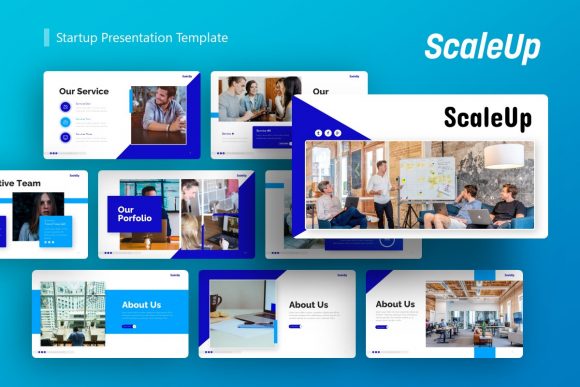
The ScaleUp template doesn’t scream for attention. Instead, it commands it through clean lines, balanced layouts, and a restrained color palette that feels both professional and energetic. It avoids the trap of overly trendy design, opting instead for a timeless modernity. The personality is one of focused ambition—this is a template for businesses that are serious about growth but want to present that journey with sophistication. The use of pixel-perfect illustrations and handcrafted infographics in PowerPoint ensures that every element feels intentional, not generic. You’re not just getting a set of pretty slides; you’re getting a cohesive design asset that tells a story of scalability.
Where ScaleUp Truly Shines: Practical Applications
This isn’t a one-trick pony. The Presentation Template - ScaleUp is built for versatility. Its clean structure makes it ideal for:
- Pitch Decks & Investor Presentations: The logical flow and professional graphics help you tell a compelling story about your market, solution, and traction without visual distractions.
- Company Profiles & Internal Reports: Use it to onboard new team members, present quarterly results, or outline strategic goals. The consistency across 36 slides builds a strong brand identity within your organization.
- Creative Agency Portfolios: Showcase your work in a framework that elevates your projects. The picture placeholders make it simple to drag and drop your own images, letting your work take center stage.
- Startup & Product Launches: From explaining your business model to demoing a new feature, the structured slides provide a clear roadmap for your audience.
It’s equally effective for a photographer presenting a new series, a marketer outlining a campaign strategy, or a small business owner creating a proposal for a new client.
Building Trust Through Design Consistency
One of the most significant advantages of using a template like ScaleUp is the instant professionalism it affords. Consistency is the bedrock of trust. When every slide in your deck shares the same visual hierarchy, typography, and color scheme, your message feels more reliable and polished. This isn't just about looking good; it's about audience engagement. A cohesive presentation is easier to follow, allowing your audience to focus on your content rather than being jarring by erratic design choices.
The template’s foundation on Master Slides is a game-changer for efficiency. Make a change to the master, and it updates throughout the entire deck. This ensures your brand perception remains uniform, even if you need to make last-minute adjustments. It’s a practical feature that saves time and eliminates the nightmare of inconsistent formatting.
Making It Your Own: Guidance for Implementation
While ScaleUp provides a powerful starting point, its real value is unlocked through customization. Here’s how to approach it:
- Evaluate the Fit: Before diving in, review all 36 slides. Does the overall tone match your brand’s personality? The template’s modern, clean style is broadly applicable, but if your brand is ultra-playful or vintage, you may need to adapt the color scheme and imagery more heavily.
- Customize with Purpose: Use the easy customizable contents to replace placeholder text with your own. Don’t just swap words—reframe the bullet points to speak in your brand’s voice. The vector icons and resizable graphics are there to support your points, not decorate them.
- Consider Your Typography: The template uses a standard, highly readable sans-serif font. For headings, you might pair it with a complementary display font or serif font from your own brand kit to add a unique touch. Experiment with font pairing to create subtle emphasis.
- Test for Readability: Always preview your deck on the screen you’ll be using. Check text size from the back of a virtual room. The layouts are designed for clarity, but your specific content needs to be legible.
- Understand the Files: You receive the PowerPoint .PPTX file and a Documentation File. The documentation is crucial—it will explain any special features or customization tips specific to the template.
Remember, the images in the demo are for preview only. You’ll need to source your own high-quality visuals. This is actually a benefit, as it forces you to use imagery that is authentically yours, strengthening your brand identity further.
A Strategic Tool for Clear Communication
Ultimately, the Presentation Template - ScaleUp is more than just a collection of slides. It’s a strategic communication tool. In a world where attention is fragmented, presenting your ideas with visual clarity and professionalism is a competitive advantage. It helps you move faster, look more established, and communicate more effectively—whether you’re in a boardroom, a virtual meeting, or sending a deck for review. For designers, entrepreneurs, and creators who value substance and style, it’s a premium asset that pays dividends in credibility and impact.