Malaca Keynote Templates: For Presentations That Actually Land
You know the feeling. You've poured hours into the content for a big presentation, but the default slide deck feels lifeless. It doesn't match the energy of your idea or the professionalism of your brand. This is where a dedicated design asset like the Malaca Keynote Templates shifts the entire dynamic. It’s not just a collection of slides; it's a framework for clear, compelling visual communication, built for people who need their work to make an impact.
Beyond Generic Slides: The Malaca Aesthetic
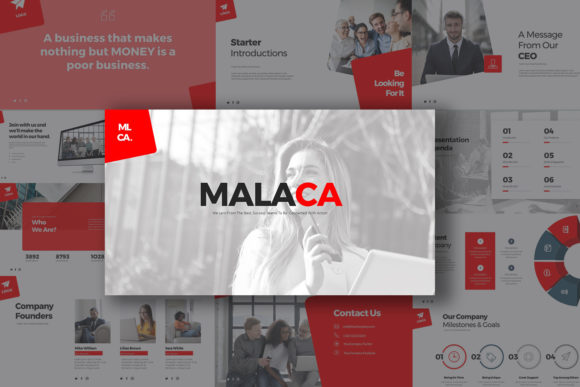
First, let's talk about what you're actually getting. Malaca presents a clean, modern typography style that feels both sophisticated and approachable. It avoids trendy gimmicks in favor of a timeless, scalable design that ensures your message stays front and center. The overall personality is one of confident professionalism, making it a flexible tool for a wide range of contexts. Whether you're pitching to investors, outlining a marketing strategy, or presenting a creative portfolio, the visual language supports rather than distracts.
The package itself is remarkably robust, giving you serious creative control. With 30 unique slide designs across 180 total slides, you have ample room to build a comprehensive narrative without repetition. The inclusion of three distinct color schemes—each on both white and dark background versions—means you can instantly adapt the look to match your specific brand identity or the mood of your topic. This isn't a one-size-fits-all template; it's a versatile kit.
Where These Templates Truly Shine
The real-world applications for Malaca Keynote Templates are extensive. For entrepreneurs and small business owners, it transforms routine business presentations into polished, investor-ready decks that build credibility. Marketers and content creators will find it invaluable for crafting visually cohesive reports, campaign briefs, and social media strategy outlines that keep clients engaged. The clean layout is perfect for editorial-style presentations, where a mix of text, images, and data needs to flow logically.
Designers and agencies can leverage it as a starting point for client work, significantly speeding up the process of building a professional brand presentation. The fully editable charts, which can be updated directly in Excel, are a practical feature for anyone regularly presenting data. The vector icons and image placeholders streamline the design workflow, allowing you to focus on content rather than fiddling with formatting.
Practical Guidance for Integration and Use
Choosing a template is one thing; using it effectively is another. Before you commit, test the visual hierarchy with your own content. Does your typical slide have three bullet points or ten? Place a sample text block into a template slide to see how the pre-designed layout handles it. The 16:9 aspect ratio is now standard, but ensure it fits your presentation environment.
A key strength is the included documentation and quick guide. This isn't an afterthought—it's essential for getting the most out of the asset, especially if you're not a Keynote power user. The guide will walk you through customization, from changing the color schemes to editing master slides for global adjustments. Remember to install the free fonts specified in the file info before opening the presentation to ensure everything renders correctly. This small step prevents a common point of frustration.
Think of Malaca Keynote Templates not as a finished product, but as a foundation. Its value lies in its structure and scalability. Use it to enforce consistency across your slides, which directly impacts audience perception of your professionalism. The clean, modern aesthetic helps establish a strong brand identity, whether for your personal brand or your company. It provides the visual consistency that makes your content recognizable and memorable.
For any professional who regularly needs to communicate ideas visually, investing in a high-quality, multipurpose template like this is a practical decision. It saves time, elevates the quality of your output, and provides the design assets needed to make every presentation—from internal meetings to public keynotes—look impressive and intentional. It’s a tool built for real work, by people who understand the demands of modern business and creative communication.