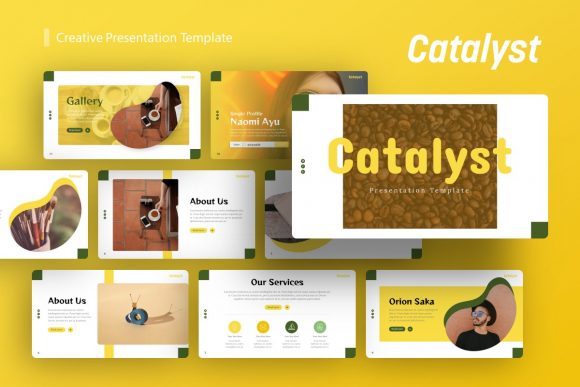
Catalyst: A Modern Presentation Template for Dynamic Ideas
You have a brilliant idea, a groundbreaking product, or a compelling story to tell. The content is solid. But when it comes to the presentation, you're staring at a blank, white slide, and the pressure is on. How do you translate that spark into a visual narrative that holds a room, convinces a client, or inspires a team? This is where the right tool makes all the difference. The Catalyst Creative Presentation Template is designed to be that tool—a versatile and professional framework built to transform your ideas into polished, persuasive visual stories.
Beyond the Blank Slide: The Visual Character of Catalyst
At its core, Catalyst is a collection of 36 meticulously designed slides for PowerPoint (.PPTX). But its true value lies in its visual philosophy. It strikes a deliberate balance between modern minimalism and impactful detail. The layouts are clean and uncluttered, using ample white space to guide the viewer's eye, but they are punctuated with handcrafted infographics, bold typographic choices, and pixel-perfect illustrations that add depth and professionalism. This isn't a template that screams for attention with flashy animations; it earns it through thoughtful composition and clarity.
The personality of Catalyst is confident, contemporary, and adaptable. It avoids overly trendy design elements that might date quickly, opting instead for a timeless aesthetic that feels both current and enduring. The use of master slides is a critical feature here, ensuring that every element—from font sizes and color palettes to placeholder positions—remains perfectly consistent across all 36 slides. This built-in consistency is a game-changer for maintaining a professional brand identity throughout your entire presentation, saving you from the tedious manual work of aligning every single text box.
Real-World Applications: Where Catalyst Shines
The true test of any design asset is its practical utility. Catalyst's strength is its remarkable versatility. It’s not built for a single niche; it's a robust platform for a wide spectrum of communication needs. Let's explore where this creative presentation template delivers exceptional value.
For creative agencies and design studios, the template serves as an ideal portfolio showcase. The slide layouts are perfectly structured to highlight case studies, project imagery, and team capabilities without visual competition. Imagine presenting your latest branding project or marketing campaign—Catalyst provides the clean, gallery-like backdrop that lets your work command the spotlight. Similarly, for photographers, it becomes a dynamic digital portfolio, moving beyond static image grids to tell the story behind the lens.
Entrepreneurs and startup founders will find it indispensable for pitch decks and investor presentations. The included handcrafted infographic slides are not just decorative; they are functional tools for visualizing data, market size, business models, and growth metrics. Transforming complex numbers into clear, engaging charts can be the difference between confusion and conviction. For corporate and business environments, it elevates internal reports, quarterly reviews, and strategic plans, replacing mundane bullet-point slides with a more engaging and professional format that reflects well on the presenter and the organization.
Even for personal use, Catalyst excels. It’s a powerful tool for a personal portfolio for job seekers, a structured format for a compelling wedding speech, or a polished way to present a community project. The ability to use it for such diverse purposes—from a high-stakes startup pitch to a personal milestone—underscores its fundamental utility.
Practical Guidance: Choosing and Using Catalyst Effectively
Adopting a new template is more than a drag-and-drop operation. To get the most out of Catalyst, a thoughtful approach is key. First, evaluate the project fit. Review all 36 slides and mentally map them to your content. Do you need multiple team slide layouts? Does your data story require bar charts, pie graphs, or process flows? Catalyst’s variety is designed to accommodate these needs, but planning your content structure around the available slides will streamline your workflow immensely.
Next, consider your font pairing and color palette. While the template includes suggested typographic styles, its easy customizable nature allows you to infuse your own brand identity. If your company uses a specific sans serif font for headings and a serif font for body text, you can apply these globally via the master slides in minutes. This is where the template transitions from a generic tool to a true extension of your brand. Test your chosen fonts for readability on screen—what looks good in a document may not have the same impact when projected.
The picture placeholder system is a standout feature for efficiency. Instead of manually cropping and positioning dozens of images, you simply drag and drop your high-quality visuals into the designated areas. They automatically conform to the predefined shapes and sizes, ensuring a consistent and professional look. This feature alone can cut your design time in half. Remember, all graphic elements are vector-based and fully editable, so you can resize icons, adjust chart colors, or modify shapes to better fit your narrative without any loss of quality.
Finally, while the demo images are for preview only, the template’s structure is built to make your own photography or purchased stock imagery look its best. Focus on using high-resolution, consistently styled photos to maintain the template's polished aesthetic. The Catalyst Creative Presentation is more than just a set of slides; it's a comprehensive system for clear, professional, and persuasive visual communication. It provides the structure so you can focus on what matters most: your story.